Powerful tools for administrators and IT teams
Extend your document model, explore the repository, audit metadata — directly from the browser, no server access required.
Portail
Nouveauté
25.1
26.0
What is it for?
Pristy Portail administration tools are a set of advanced graphical interfaces allowing IT teams and administrators to manage the document model, explore the repository and audit the platform — no server access, no command line, directly from the web interface.
Three distinct tools cover the essential needs: the data model manager to create and deploy custom Alfresco types and aspects, the node browser to navigate and edit at low level, and the model explorer to audit the entire model in place.
Data model manager
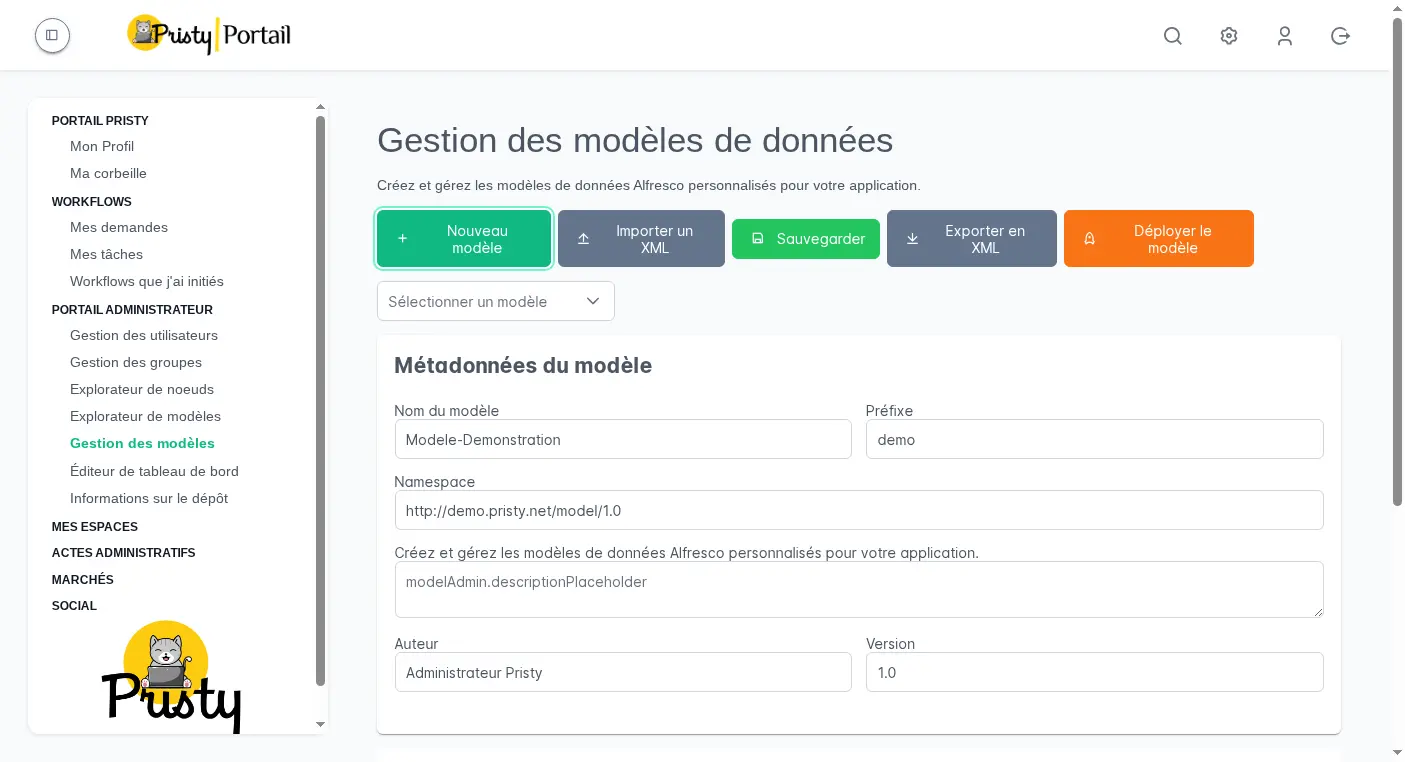
Create custom Alfresco content types and aspects from a graphical interface, without touching the server. Define your properties, data types, constraints and associations, then deploy directly into the Alfresco Data Dictionary in one click.
- Create / import a model from scratch or from an existing XML file
- Define types (document types, folders) and aspects (reusable metadata)
- Deploy and activate the model in Alfresco without restart
- Export to XML to version or migrate your models
Extend your document model without touching the server.
Node browser
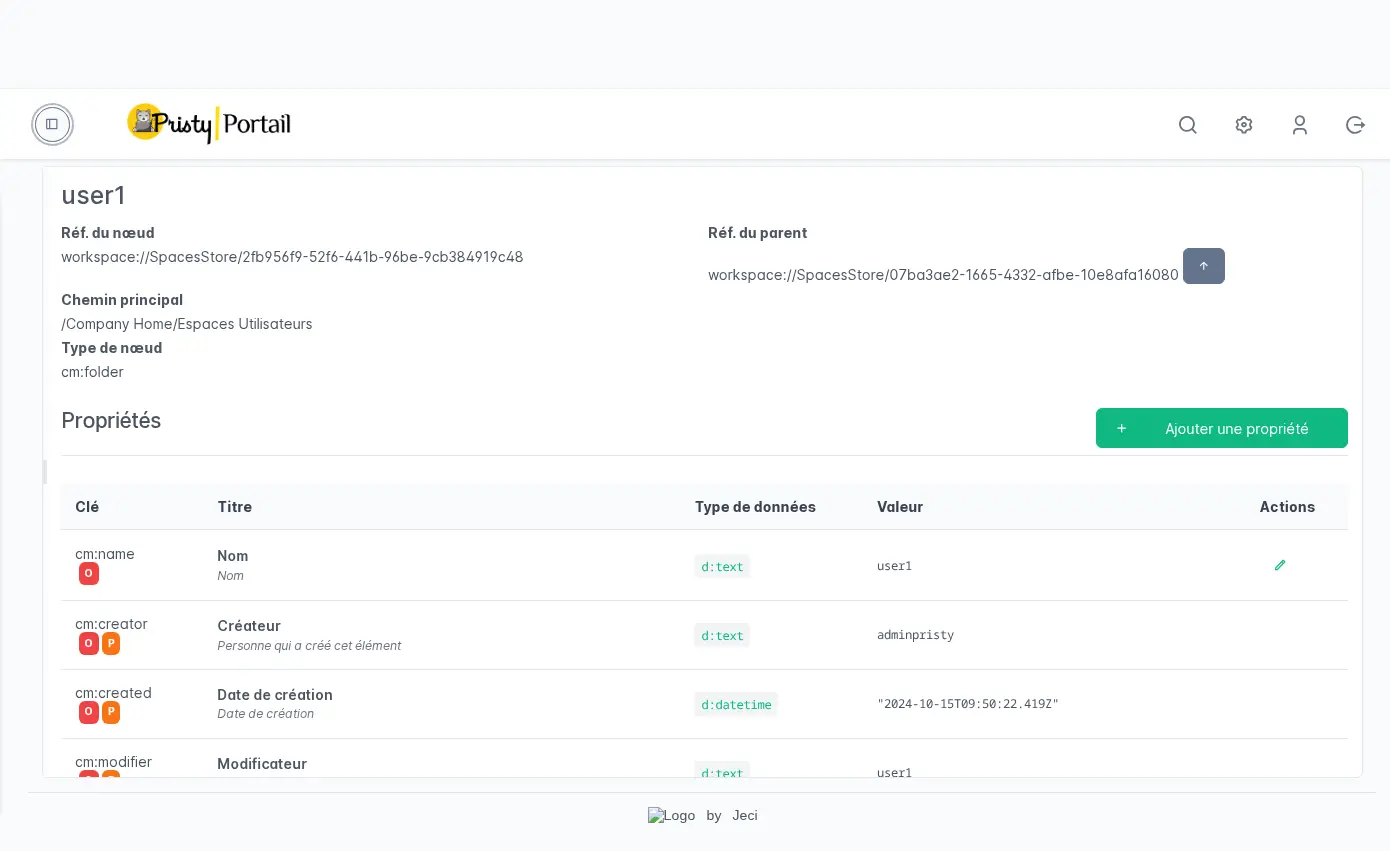
Navigate the Alfresco repository at low level. Each node is accessible with all its properties, metadata, aspects, permissions, associations and version history.
- Predefined or custom AFTS queries, saveable
- Edit metadata and properties directly from the interface
- Manage aspects: add, remove
- Full-screen text file editing (JSON, XML, Markdown…)
- File upload and version management
Model explorer
View all types and aspects defined in your repository — native Alfresco types, standard aspects and custom models. Properties, inheritance hierarchies, mandatory aspects: a readable reference without technical access.
Useful for auditing the model in place or preparing an extension.
Workspace administration (26.0)
Administrators now have a workspace administration view in Pristy Portail: a complete list of all workspaces (active and archived), configurable workspace types via a graphical interface, member management and handling of pending access requests.
- Admin workspace view — list with active/archived filter, direct access to each space’s settings
- Workspace types — define reusable templates (icon, colour, enabled options) without going through the server
- Members and requests — handle access requests and manage members from the Portal, without switching into each space
Also available in 26.0: OOTBee admin pages (caches, active sessions, SOLR, JavaScript console, scheduled jobs) — accessible to administrators from the Portail admin menu, without server access.
When should you use it?
A few concrete examples:
- IT / Solution architect — Create a custom metadata model for your organisation (type “Contract”, aspect “Confidential”, mandatory properties…) from the interface, without application deployment.
- Functional administrator — Audit the properties of a problematic document or fix metadata directly from the node browser.
- Integrator — Verify the deployed data model, export the XML to version it in your code repository.
How does it boost productivity?
No more server interventions to extend the document model. Operations that previously required SSH access, configuration file editing or a service restart now happen from the browser, by IT teams, without risking damage to the production environment.
For integrators and architects, it also speeds up development cycles: creating, testing and adjusting a data model takes a few clicks, without going through a full deployment pipeline. And XML export allows models to be versioned in a code repository like any other artefact.
Frequently asked questions
Do these tools require server access or special rights?
No, everything is accessible from the Pristy Portail web interface. Only an administrator role is required — the visibility of administration menu entries automatically adapts to the role of the logged-in user.
Can the data model be modified without restarting Alfresco?
Yes. Model deployment is done directly from the graphical interface, without service restart. The types and aspects created are immediately active in the repository.
Is the node browser accessible to all users?
No, it is reserved for administrators. Administration menu entries in Pristy Portail are displayed or hidden based on the role of the logged-in user.
Other recent features
- PDF consultation — Consultez vos pdfs facilement, qu'ils contiennent 2 ou 650 pages.
- Classification plan — Automatically structure your workspaces with the Pristy Espaces classification plan. Define document types and folder hierarchy — Pristy classifies on deposit, without interrupting activity.
- Customisable dashboard — Access what matters most from the moment you log in with the customisable dashboard in Pristy Portail. Profile-based home pages, configurable blocks, personalised by each user.
- PDF editing tools — Edit your PDFs without leaving Pristy — reorder pages, redact, merge, sign. Directly from the viewer, versioned automatically.
Planned developments for this feature
There is always room for improvement! Here is what we have planned for the future of this feature:
- Monitoring tools (performance, active sessions, logs)
How to get Pristy
Order Pristy today and benefit from modern, intuitive document management
Pristy also includes Pristy Portal application that offers profile and user pages. Pristy Portail is included with the purchase of Pristy Actes and Pristy Espaces (solo or together). Pristy Portail can also be purchased on its own.
Go to our rates page to find out more. Request your quote now and take advantage of our low rates and the chance to give your opinion on future features!